


Showing posts with label Productivity. Show all posts
Showing posts with label Productivity. Show all posts

This widget will help you to start your prefered apps or call your best friends - but with style!
You can add some frequently used apps, contacts or bookmarks to this launcher and start those apps, contacts or bookmarks with one click from a circle, a horizontal or a vertical line.
Use the included launcher icons, load your own image or use a icon from any icon pack (CircleLauncher icon packs and ADW launcher icon packs supported). If you slide over the icons, they are animated a little bit mac-like ... just try it!
Additional features in the full version:
custom icons for the icon on the homescreen
support for ADW icon packs for the icon on the homescreen
vertical and horizontal launcher versions
Some icons in the screenshots are from 'CircleLauncher IconPack One' and the wallpaper is 'wp clock full'.
There is an issue with Android 3.x (and higher): Some devices need a restart (or wait a few hours) until the new installed widget appears in the widget list. But at the moment, I don't know the reason ...
Facebook-User, please read: Restricted contacts are created by the Facebook sync adapter. These contacts are accessible to a whitelist of applications, which is specified and enforced by Facebook. The restricted contact API is private, which means that nobody (with the exception of Facebook) should be using it at this point. So the only way to get the pictures from your Facebook contacts is to use another tool to synchronize. I would suggest to use 'SyncMyPix', please try it!
What's in this version : (Updated : Aug 9, 2012)
new animations (check launcher configuration)
Chinese translation by Leo Yang - Thanks!
small bugfixes
Required Android O/S : 2.1+
Download : 700Kb APK
Screenshots :


Download here:

The most popular note taking application in Amazon app store is now available at Google Play.
After enduring tons of clumsy note applications, which were not very intuitive nor easy to use, we have created Handy Note to fulfill our needs.
We developed our product to make it powerful and easy to use. Our aim is to bring a handy tool to the market that will replace paper notebooks and keep the same user experience.
The characteristics of Handy Note can be summarized in three words “Freedom, Professionalism and Convenience”
Freedom
You have the possibility to navigate between numerous tools. You can input text, hand write, free draw, insert symbols, drag shapes or insert photos anytime and anywhere you want, just as you do in a blank paper.
Professionalism
Handwriting experience provides by Handy Note is even better than writing on a piece of paper. The state of art design templates, note covers and papers, sticky papers, symbols to make your notes look nice.
Convenience
Slide Show enables you to present your ideas without PowerPoint. You can copy and delete handwritten text word by word. Share with other Android devices or backup to Drop box.
Product Features
Magic Pen: a creative technology to improve the handwriting quality. This will get you to enjoy handwriting on Handy Note more than on paper. (Samsung S Pen is supported)
Rich Media: put text, handwriting, photos, symbols, shape on the same page just as you do in a blank paper.
Editable handwriting box with word by word copy & delete, bulletin & numbering, alignment, and box style settings.
Built in note & paper templates, text box & handwriting box background templates and 200 symbols.
Share among different sizes and resolutions of Android phones/tablets of images, PDF files or Handy Note files through email, bluetooth, WIFI, Dropbox, etc.
Ready to Use: pre-define planner, diary, meeting minutes, class note and other templates with multiple different pages. Templates have formatted text & handwriting boxes for you to start taking notes.
Product Description
Content
Text with in place text editing, sticker style background, size, color, numbering, bullet, etc.
Handwriting with customizable pen style, scalable writing area.
Full screen draw with lasso selecting and style changing.
Format
Multiple objects: layer changes, alignment, distribution, group/ungroup, position lock.
Templates: place holder replaces.
Draw & Handwrite: 5 different kinds of pens with 6 colors and 6 strokes.
Text: 24 sticker style backgrounds, size, color, numbering, bullet, align, etc.
Resource
Templates: multiple pages templates in basic, time management, diary, business, academic, personal and others categories.
Paper & Cover: more than 20 papers/cover styles in basic, time management, diary, business, academic, personal and others categories.
More will available from our web site
Sharing
Share among different size and resolution Android phones/tablets.
Share as image & PDF files for popular use.
What's in this version : (Updated : Jul 31, 2012 )
Add private note function to protect privacy.
Improve user experience by altering indicators
Update user`s guide and video user`s guide
Support Android 4.1
Desktop Widgets
Bugs fix
Required Android O/S : 2.2+
Download : 24Mb APK
Screenshots :


Download here:

Android Task Manager is the overall system application.
Task, Application, Sd card, Device, system information can be managed in a single shot.
Task Management (Task)
If you touch the item, manage menu will appear.
Background, a list of running processes that are stopped
Service Process : does not show up as a service to users running process (mp3 music playing, atmospheric transmission network, etc.). Should be reviewed when you end.
Background Process : applications to users that do not show up. Safe to end.
Empty Process : Kill-able process. Cached application
Used Memory information
Package information
The process stop, restart, delete, and detailed information
Add ignore list and Ignore list management
Auto-kill task
Shake-kill task
Startup-kill task
One-touch-kill task
Favorite application list
Application share(Recommend)
Application Management (Applications)
If you touch the item, manage menu will appear.
A list of installed applications
Package information
App Version information
App file size
To run, delete, update, verify, assess, comment Leave, More info
Backup to SD Card
Install and Delete from SD Card
External APK file install support. (Android package install file) (path : /sdcard/smart/manager)
Application search
Favorite application list(Widget service support)
Application share(Recommend)
Information(Progress bar)
Device information
CPU info
Ram info(Total, Used, Available)
Battery Information(Temperature - Celsius, Fahrenheit)
Internal storage space, information(Total, Used, Available)
External storage space, information(Total, Used, Available)
Settings
Android Task Manager Settings
Volume control
Screen brightness
Wireless network
My location (network, GPS)
The application
Bluetooth Settings
Language settings
The date and time
Home screen widget
Widget Update Time Adjustable
specify the possible actions when clicking widgets (one-touch kill or task management screen)
Update info / Avail Ram(1×1)
Update info / Total Ram, Avail Ram(2×1)
Internal Storage / External Storage Info(2×1)
Active Task, Ram, Storage (3×1 Orange Theme)
Active Task, Ram, Storage (3×1 Red Theme)
Active Task, Ram, Storage (3×1 Black Theme)
Favorite Application Link (2×2 Black Theme)
What's in this version : (Updated : Mar 9, 2012)
Task Manager engine upgrade
App Manager engine upgrade
UI changes and improvements
Checking real-time process
Required Android O/S : 2.1+
Download : 2.5Mb APK
Screenshots :


Download here:

GreenPower battery saver brings many extra hours to your battery life!
Unlike other battery savers that require regular user manual actions, GreenPower is fully automatic: Once configured, it runs and saves your battery by itself. It does so by smartly managing Wifi, Mobile data & Bluetooth (*):
Turning them off when you don't need them, but ensure minimum disturbance: Automatic turned ON when needed by you or by other apps (e.g retrieving mails).
Similar but easier cleaner and faster than JuiceDefender!
HIGHLIGHTS
Handles WIFI, Mobile Data (2G, 3G, some 4G) & BLUETOOTH
Supports most phone types (both GSM & CDMA) and most carriers
Supports Android ICE CREAM SANDWICH, HONEYCOMB, GINGERBREAD & FROYO
Mobile Data toggling using clean Internal API or APN renaming (you can chose)
Most features below available in Free version unless marked with (*)
INSTALL AND FORGET
Or take time to configure to get the most out of it!
24H MONEY BACK GUARANTEE (premium)
Google's 15 minutes trying time is too short for such an app. Try Premium for 24H and get a refund if you didn't like it.
Features:
Wifi mgmt: Based on schedule, screen state, power connected, signal level...
Mobile data mgmt: Based on schedule, screen state, power connected...
Mobile data mgmt: Either Internal API or APN renaming
BLUETOOTH (*) mgmt: Based on devices connected or in range, screen state, power etc
Traffic check: Configurable to prevent disturbing other apps
Apps Whitelist (*): To keep data on when using specific apps (like music streaming)
Simple WIDGET (*): To quickly pause or resume
NIGHT (*) mode fully configurable, Airplane mode...
Tasker & Locale Plug-in (*)
Compatible with Cerberus 2.0
Very lightweight and fast app
Easy and clean interface
Fully configurable settings
Settings backup / restore
20 Languages (changeable at run time)
And more...
SUPPORT
Dedicated Forum for support issues
Support from the developer. I'm answering each issue.
Regular updates with bug fixes and new features
PREMIUM version specific features:
Bluetooth support
Widget
Night mode
Tasker & Locale Plug-in
Apps whitelist
No ads
The good feeling to support an independent developer ;-)
What's in this version : (Updated : Jul 14, 2012)
Various bugfixes and improvements.
See release note inside app for details.
Required Android O/S : 2.1+
Download : 1Mb APK
Screenshots:


Download here:

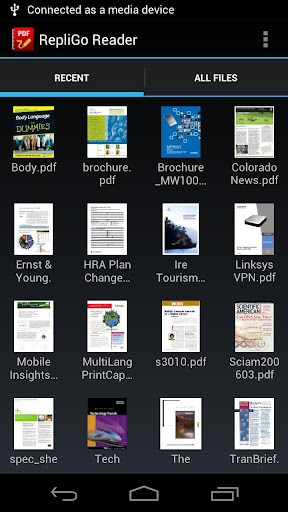
RepliGo Reader enables PDF viewing, annotating and form filling. Review documents on the go by adding highlights, cross outs, underlines, sticky notes, arrows, lines, ovals, rectangles, freehand drawings and text boxes. Comments are stored as standard annotations in the original PDF file, just like Adobe® Acrobat®.
RepliGo Reader integrates seamlessly with Gmail, Dropbox, Evernote and numerous other applications. It also makes a great eBook reader, with features like night mode and an intelligent reading view.
Features :
PDF viewing, annotating and form filling of files from your email, memory card, Dropbox, Evernote and the Internet
Add highlights, cross outs, underlines, sticky notes, arrows, lines, ovals, rectangles, freehand drawings and text boxes
Adjust colors, border thickness and the note for any annotation
Read documents easily with reflowed text and night mode
Scroll quickly through pages by swiping or tapping on the edge of the screen
Navigate long documents using bookmarks, comments, document links, go to page, search and thumbnails
Click on email, map, phone and web hyperlinks to launch system applications
Zoom in and out quickly by pinching or double-tapping on columns, images or tables
Select text and copy it to the clipboard
Rotate documents into one of four orientations
Open password protected files
Send PDF files via email, Bluetooth, Dropbox and Evernote
Keyboard and trackball support
What's in this version: (Updated :Jul 11, 2012)
Fixed issue with accessing the Settings screen on various devices.
Fixed issue with font parsing on certain types of documents.
Fixed issue with text box annotations after choosing File > Open.
Fixed issue with annotations not being displayed after accessing the Comments popup.
Miscellaneous bug fixes.
Required Android O/S : 2.0+
Download : 1.5Mb APK
Screenshots :


Download here:

With NotifierPro ( Notifier Pro ) you can greatly improve the way your device displays notifications.
This app provides banner notifications for any app installed on your phone.
Support :* If you have any question or suggestion, please use our feedback page here :https://getsatisfaction.com/productigeeky.
The service:
To work properly, NotifierPro requires that you activate the accessibility service "NotifierPro" (accessibility services are currently the only way to process user notifications on the Android OS).
You then have to use the "Monitoring" section to choose which apps should raise notifications, and how.
Status bar notifications must be enabled in the monitored apps for the banners to appear properly.
How to use it:
Click the notification to launch it
Swipe to the right to dismiss it
Swipe to the left to dismiss notifications coming from the same app/contact
Important information:
Note that dismissing the notification won’t remove it from the status bar (the Android OS doesn’t currently allow to manually remove 3rd party apps notifications from the status bar).
If you use a custom lockscreen app such as MagicLocker or WidgetLocker, or if you use the stock Android 4 ICS lockscreen, banners will show above your lockscreen.
As a default, notifications will be enabled for SMS, MMS, missed calls, GMail, Talk, WhatsApp, Facebook, Twitter, Skype, etc...
NotfierPro will notify you even if you're in a fullscreen app
Plus version:
You can set individual settings for each app
You have access to 5 exclusives themes
You can choose the text position
You can hide the icon
You can choose the size for the banner
You can set custom vibration patterns
You can choose the action when you do a left or right swipe on the banner
You can disable clicks
You can set quiet hours
You can use reminders
You can use privacy options
You can display the contact picture for any app (experimental)
What's in this version : (Updated : Jul 10, 2012)
Improved UI
You can now set reminders for each app
You can now display the time of the notification
You can now disable notifications during a call
New screen off only mode : Displays banners only when the screen is locked
You can now set the banner alpha
Numerous bug fixes
Numerous new exciting features, check it out !
Required Android O/S : 2.1+
Download : 1Mb APK
Screenshots :


Download here:

Memory Booster is a powerful mobile memory & RAM boosting tool specially designed for Android smartphone users. It is designed to tackle the difficult yet crucial problem of memory management for all Android devices.
Memory Booster reclaims lost memory for your programs by defragmenting your smartphone's memory and recovering memory leaks from poorly behaved applications.
Features:
Real-time Memory Status Report & Monitor - Memory Booster provides a live chart to demonstrate your device's total/free memory and current memory usage.
Setting Your Performance Target - With Auto Boost Threshold set, Memory Booster keeps your memory higher than desired level, and act immediately if memory drops down.
One-click Quick Memory Boosting - Besides automatic memory boosting, Memory Booster also allows you to manually boost your memory by Quick Boost.
Auto-boosting in the Background - With Auto Boost Interval, Memory Booster runs in the background and automatically reclaims memory for your Android at interval.
Android system crash protection - Memory Booster always watches your system resources and cleans up system memory once it reaches a critical point.
Other features include embedded Task Killer, Whitelist Manager, Boost Level Manager & Memory Boost Log, which assist Memory Booster to perform more efficiently and friendly.
What's in this version : (Updated : Jul 6, 2012)
Change widget look
Improve the situation that "widget not working" on some devices
Other minor improvements
Required Android O/S : 1.6+
Download : 330Kb APK
Screenshots :


Download here:

Calendar-Application with scroll- and zoomable multi-day view and much more
Business Calendar is a complete calendar application that is synchronising with your Google calendars!
Features :
smooth scroll- and zoomable multi-day view (1-14 days)
graphical and textual presentation
month, agenda, day and event view
quickly fade in/out calendars using the favorite bar
search function
drag&drop functionality
configurable widgets in different sizes for month, week, agenda and day view
easy switching between timeline bars and event titles in month view
intuitive new handling option: just move your finger over some days of interest in month view to open them in the multi-day view
quick day overview when adding a new event
many options for recurrent events (e.g. to add a recurrent event that takes place every other week on Tuesday and Thursday)
option to link a contact to an event
configurable font sizes for the app and the widgets
option to select individual calendars for each widget
context-sensitive help system to optimize your work with Business Calendar
Please do not move the application to the sd card if you want to use the widgets (general limitation of the Android operating system)!
You can use our own Business Calendar reminders or the reminders of the stock calendar application to get alarm messages for your events! If you use our own reminders please remember to disable the alarm messages of the stock calendar application!
What's in this version: (Updated : Jul 6, 2012)
Templates for events:
save existing events as templates or create templates from scratch
use a template when adding a new event
edit and delete templates
option to set a default template for events
Other changes:
meeting organizer will also show up now for Exchange calendars
background of popup window in month view displayed properly now when scrolling window on 4.x devices
app crash fixed when tapping on contact name in event details view
some more changes and bug fixes
Required Android O/S : 2.0.1+
Download : 800Kb APK
Screenshots :


Download here:

